For PC gamers

Switch to Linux. Keep everything.

Last1 brings together the software that makes Linux a no-brainer for gaming: go-to-linux installs it alongside Windows without losing your games, and SoundFence keeps your soundboard and voice effects on Discord.

The Bundle gets you go-to-linux and SoundFence for less than SoundFence on its own. go-to-linux lands in your account the day it's released.

  • Windows is never wiped
  • Your Steam, Epic and GOG games come with you
  • Cancel online at any time

Two apps, one goal

Leave Windows behind without losing anything that matters when you play. You get both in the Bundle.

go-to-linux

Windows 10 and 11

Installs CachyOS, a Linux built for gaming, alongside Windows. No USB stick needed.

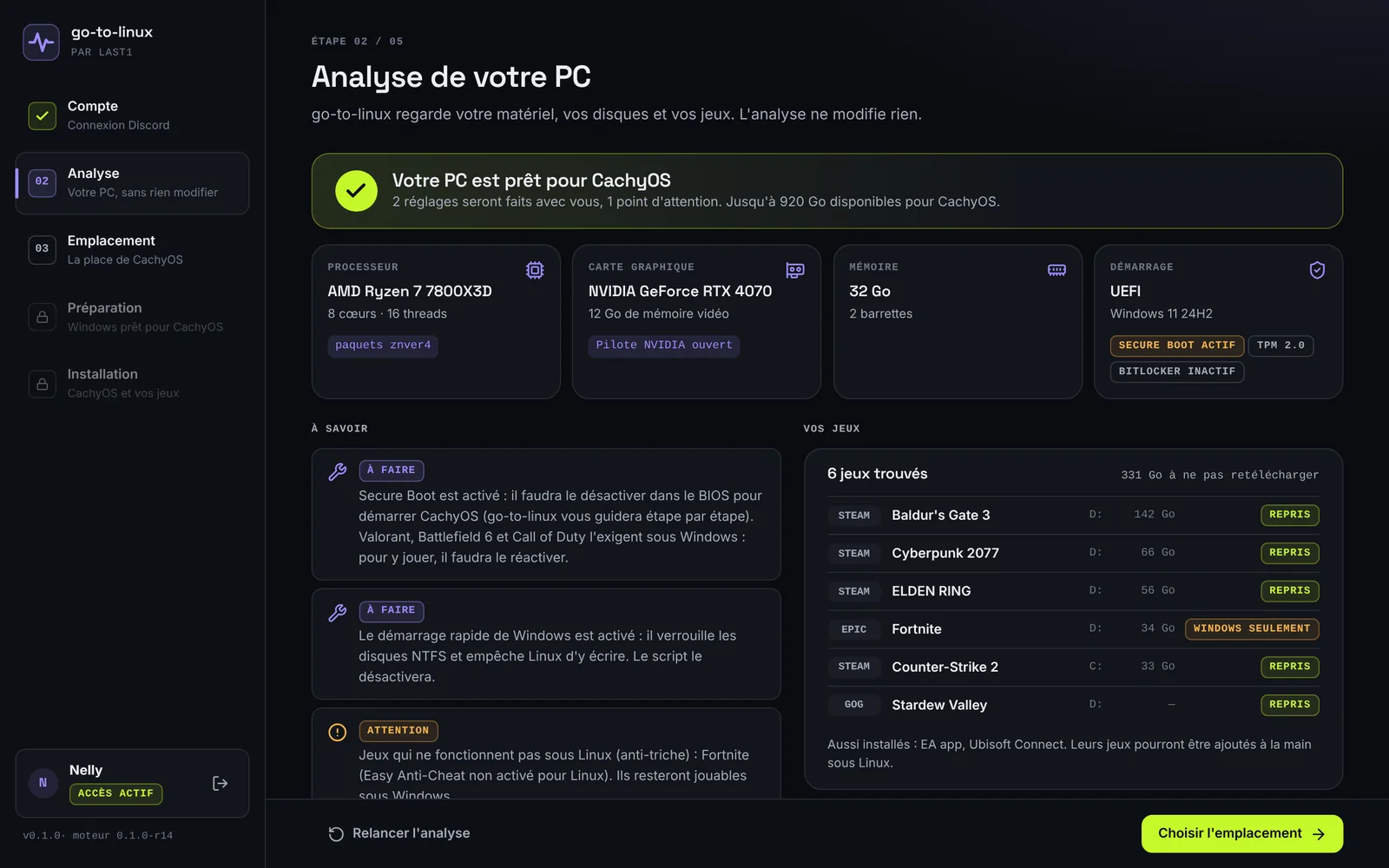
  • Checks your PC before touching anything
  • Steam, Epic and GOG games carried over, playable on both sides
  • Drivers matched to your graphics card
SoundFence

Linux · CachyOS recommended

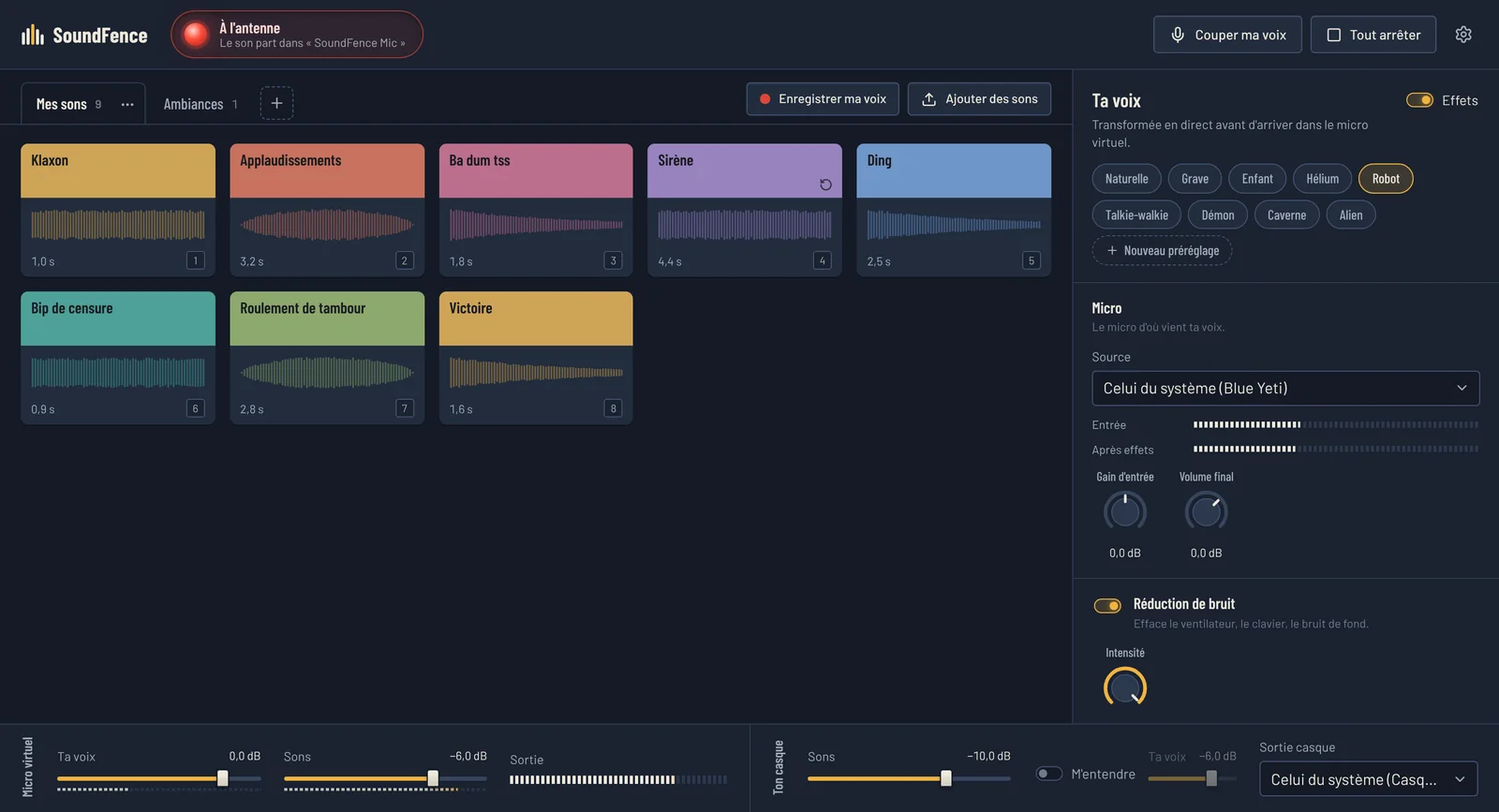
Soundboard and voice changer for Linux, with a virtual mic for Discord, OBS and your games.

  • Sounds laid out as carts, layered playback, headphone preview
  • Noise reduction, pitch, robot, walkie-talkie, echo, reverb
  • Global hotkeys on any Wayland desktop

A look at the apps

Clear interfaces that tell you what they are going to do before they do it.

The SoundFence window: sound carts, voice effects and mixer
SoundFence
The PC analysis in go-to-linux: hardware, things to know and games carried over
go-to-linux · in development

The shortest route to Linux

The Bundle covers the whole journey, from your first click on Windows to your first game with friends on Linux.

  1. 01

    Install

    go-to-linux checks your PC, frees up space and installs CachyOS alongside Windows, with the right drivers.

    go-to-linux
  2. 02

    Play

    The games you've already installed are carried over: nothing to download again. Every time you boot up, you pick Windows or Linux.

    go-to-linux
  3. 03

    Talk

    SoundFence creates a virtual mic: your sounds and your transformed voice reach Discord just like they did on Windows.

    SoundFence
The Last1 Bundle · —

go-to-linux and SoundFence in a single subscription, for less than SoundFence on its own. No commitment.

Get the Bundle

Pricing

Monthly subscriptions with no commitment, cancellable online, or a one-time payment. All taxes included. Updates included.

Frequently asked questions

What is the Last1 Bundle?

A monthly subscription that brings together go-to-linux and SoundFence, for less than SoundFence on its own. SoundFence is available right away; go-to-linux lands in your account the day it's released, at no extra cost.

Can I switch plans later?

Yes, between SoundFence and the Bundle, from “My account”: the switch is immediate and the current month is prorated.

Why a Discord account?

It's your Last1 account: no password to create, and your subscription follows you on the site and in the apps. We only keep your Discord ID and name, and we have no access to your email, your servers or your messages.

How many PCs can I use the software on?

All of them. Log in with your Discord account in the app: if it has paid, you're good to go. No key, no activation. The account stays personal.

Can I try SoundFence without subscribing?

Yes, with the one-week pass: a one-time payment, with no subscription and nothing charged afterwards, plus go-to-linux free for life. Each pass you buy adds another week straight after the previous one.

How do I pay, and how do I cancel?

You pay on Stripe's secure page (we never see your card). You can cancel a subscription at any time from “My account”: your access stays open until the end of the period you've already paid for. One-time purchases (lifetime licence, pass) have nothing to cancel.

Are updates included?

Yes, for as long as you have access: every new version shows up in “My account” as soon as it's published. With the go-to-linux lifetime licence, updates stay included, with no subscription.